Features and benefits
Everything between a blank canvas and an approved process
What the plugin does, and what each part saves you from. Every feature on this page is in the free version too.
Modelling
A full BPMN 2.0 editor in the browser
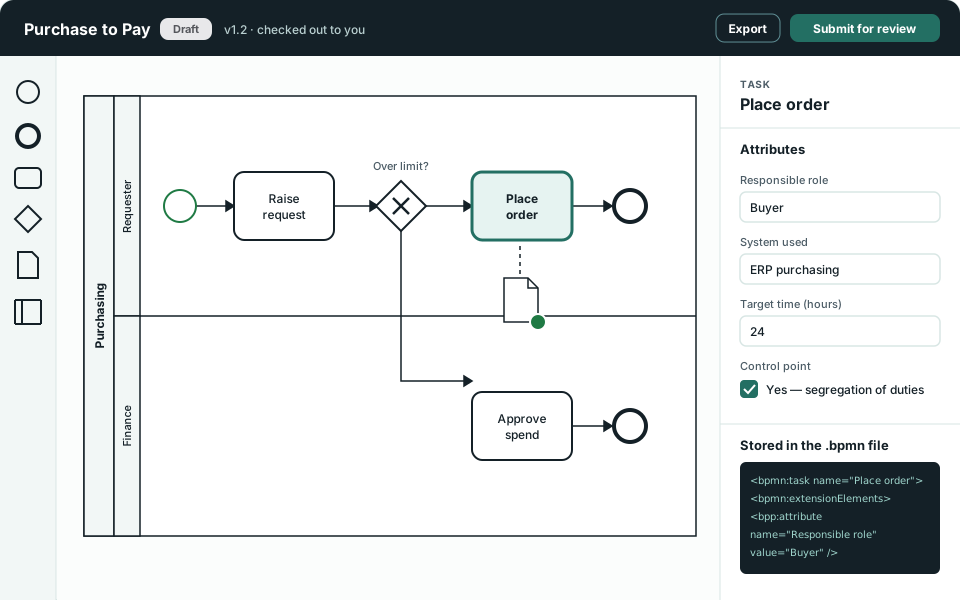
- Built on bpmn-js from bpmn.io, the open-source BPMN toolkit, so diagrams follow the standard notation.
- Every task, event and gateway type, with sub-processes, pools, lanes, data objects, data stores and text annotations.
- Record your own attributes on tasks, events, gateways and call activities, such as the responsible role, the system used or a control point.
- Link a Call Activity to another model and drill down from an overview into the detail, with breadcrumbs back up.
- Check a model out while you edit so nobody overwrites your work, then check it in as a new version.
- Keep the version history and restore an earlier version when you need it.
Why it matters
Attributes are saved inside the .bpmn file, in the standard’s own extension elements. Your process data is never locked in a format only this plugin can read.
Review and approval
A lifecycle with a clear sign-off
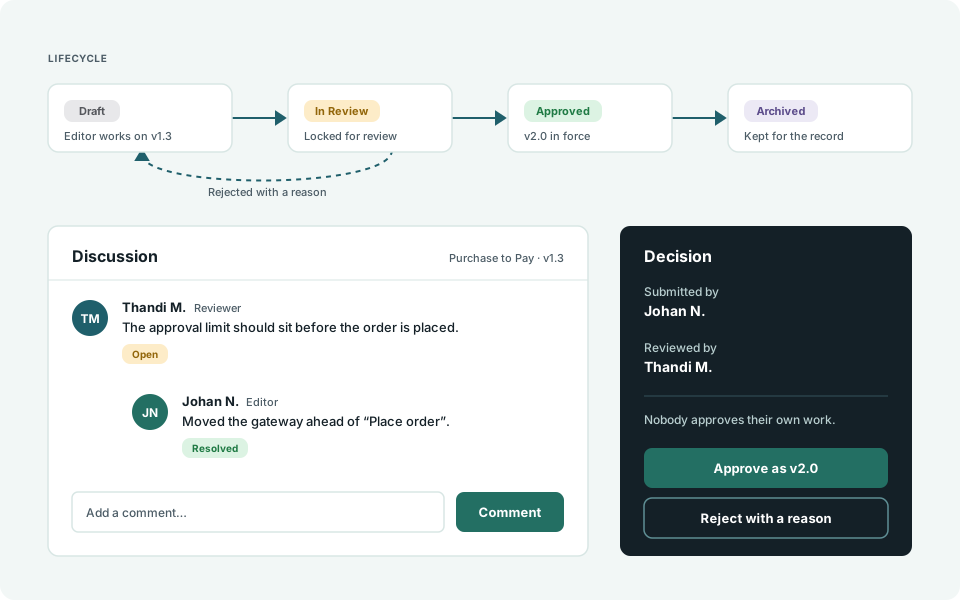
- Four states: Draft, In Review, Approved and Archived. A model is locked while it is in review.
- Segregation of duties: the person who submits a model cannot approve it.
- Discussion threads on every model, with replies, mentions and a status on each comment.
- Email notifications when something is submitted, approved, rejected or assigned, or when you are mentioned.
- An Awaiting Review list that shows each reviewer what needs their decision.
- Major and minor version numbers, so an approved release is easy to tell from work in progress.
Why it matters
When someone asks who agreed to this process and when, the answer is on the model: the submitter, the reviewer, the comments and the version.
Documents
A document library beside your models
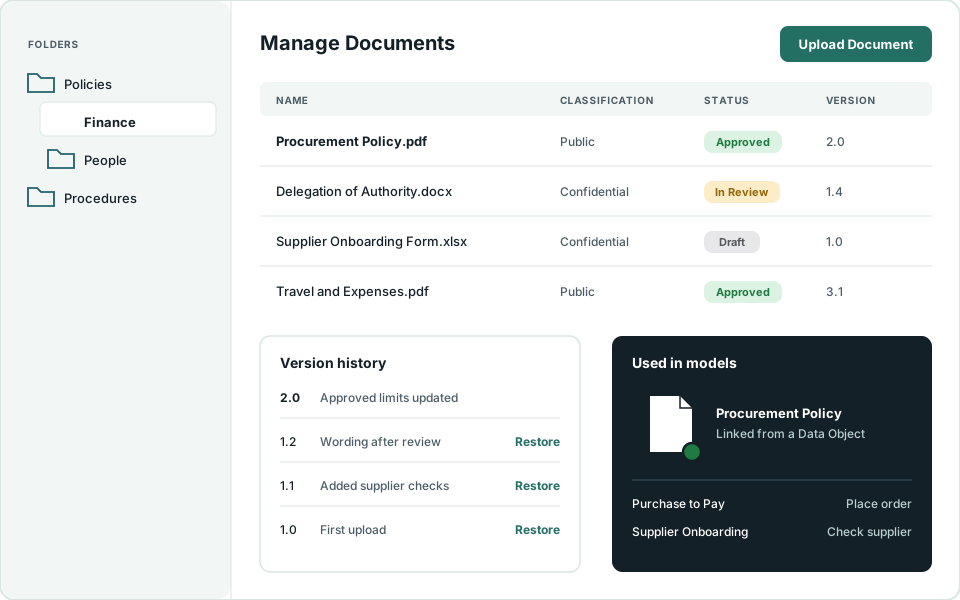
- Upload Word, Excel, PDF, text and image files into folders, one at a time or in bulk.
- Check out, upload a new version with a change note, and restore an older version.
- Documents go through the same Draft, In Review, Approved and Archived lifecycle as models.
- Label each document with a classification you define, and filter by it.
- Link a document to a Data Object on a diagram. A green marker shows an approved version is in force, an amber one shows it is not.
- Switch the whole library on or off in System Settings. Switching it off deletes nothing.
Why it matters
The policy a step depends on is one click from the step, and readers always open the approved copy instead of an old attachment.
Roles and audit
The right access on each item, and a record of what happened
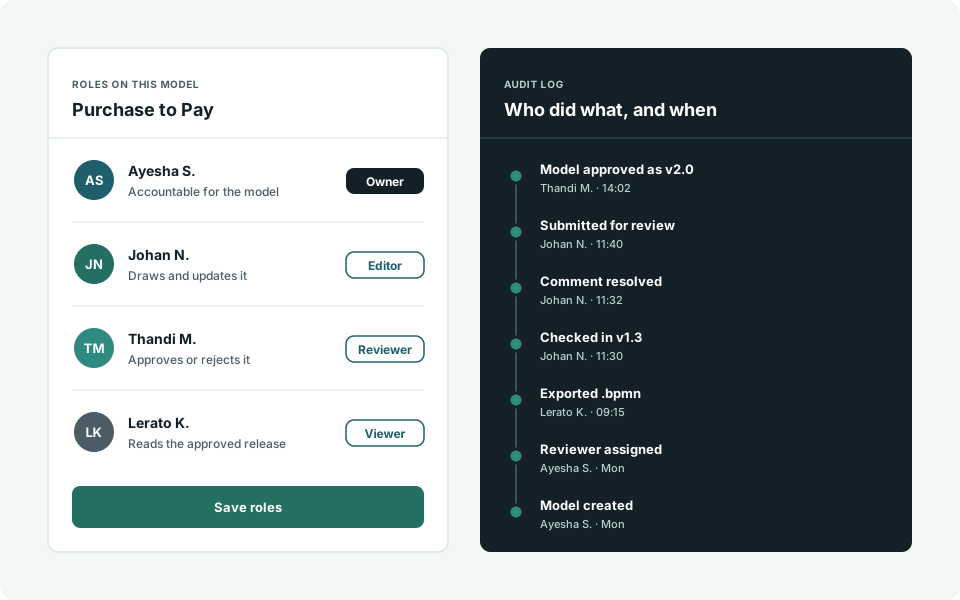
- A role per model and per document: Owner, Editor, Reviewer or Viewer.
- One named Owner for every item, who can be changed when responsibilities move.
- Administrator is the only site-wide role, and only Administrators create new items.
- Assign several people at once, with search and filters for long user lists.
- An audit log of repository activity, including every download and every AI call.
- Archive old audit entries to a CSV file when the log grows.
Why it matters
Someone can edit the processes they own and only read everyone else’s. You do not have to choose between locking the library down and opening it up.
Portal and publishing
Put processes where people already look
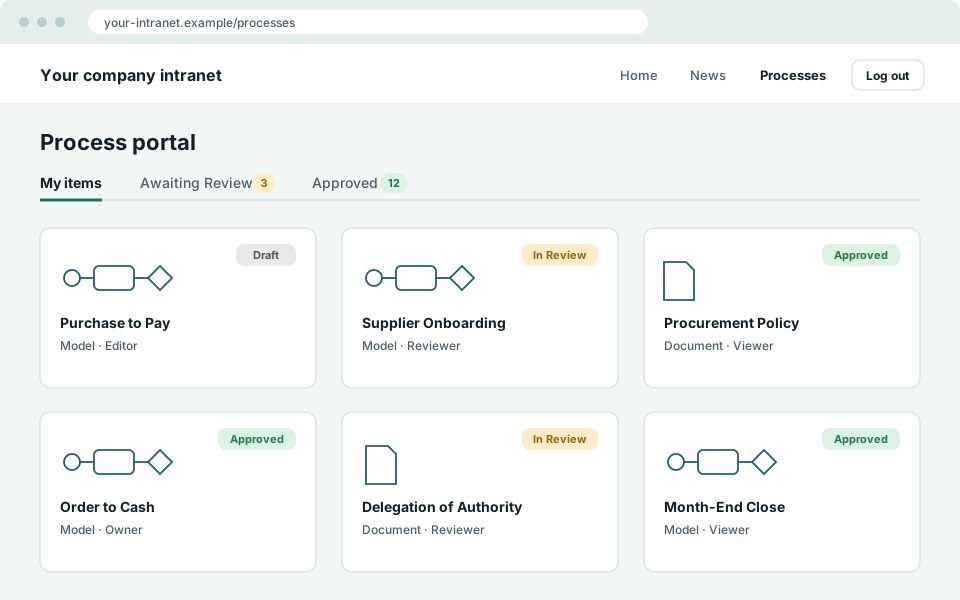
- A front-end portal you add to any page with a shortcode: My items, Awaiting Review and Approved, with the full editor included.
- Approved lists for readers, showing the approved versions each person is assigned to, with downloads.
- Public lists for visitors who are not logged in, limited to approved items you have classified as Public.
- Public items open in a view-only viewer with a watermark, with no download and no print.
- A choice of looks for the plugin’s screens, including the Portal Teal theme.
Why it matters
Most staff only need to read the current process. They get a page on the intranet, and never see a draft or the WordPress dashboard.
Import and export
Bring your diagrams in, and take them out again
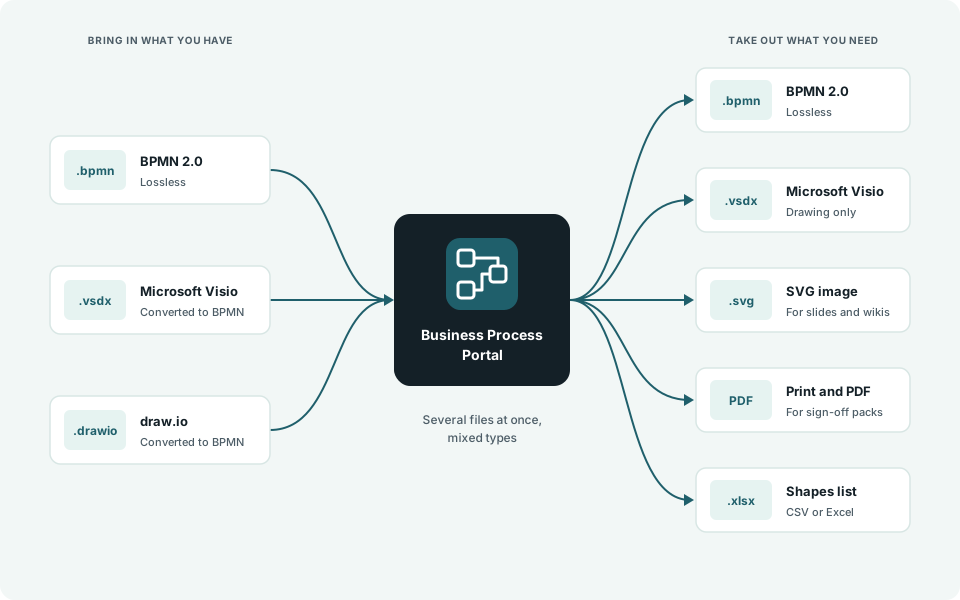
- Import BPMN (.bpmn), Microsoft Visio (.vsdx and .vsdm) and draw.io (.drawio) files, several at once.
- Visio and draw.io drawings are converted to BPMN, with a tidy layout and a result listed for each file.
- Export to .bpmn with nothing lost, or to Visio as a drawing that imports back.
- Export an SVG image, or print to PDF.
- Export a list of every shape and its attributes to CSV or Excel.
Why it matters
You do not have to redraw years of Visio diagrams to get started, and you can leave with standard files whenever you choose.
AI Review
A second pair of eyes before you submit
- An advisory review of a model or document, run by the people editing it.
- Combines built-in checks with a review by Claude, the AI model from Anthropic.
- Findings are posted as Discussion comments, so they are handled like any other feedback.
- Administrators control it in System Settings, including the privacy options.
It advises. People decide.
AI Review never approves or rejects anything. The decision stays with your reviewers.
What it is not
Business Process Portal documents processes. It is not a workflow engine and does not run or automate them. It models process and collaboration diagrams. Choreography and conversation diagrams are not supported.
What you need
A self-hosted WordPress site: WordPress [MINIMUM WORDPRESS VERSION] or later and PHP [MINIMUM PHP VERSION] or later.
All of this is in the free version
Use every feature for your first 5 models. Pay only when you need more.